















When you start working with a new ad network or testing a new type of traffic, the fastest way to gather data is often a broad RON campaign. The problem is that RON covers a huge number of placements, and many of them just aren't relevant to your offer. Before you know it, a good chunk of your budget has disappeared into zones that never had a chance of converting.
To help you run tests more efficiently and reduce that wasted spend, we've added IAB targeting to Direct Click campaigns. This feature lets you narrow your focus by site content category right from the start.
In this article, we'll explain how IAB targeting works, then walk you through the main points of an actual RON test we ran: from initial setup through optimization to final results.
Let's get into it.
IAB targeting explained
In simple terms, IAB targeting is a way to sort websites by the type of content they publish, using a standard set of categories created by the Interactive Advertising Bureau. Instead of guessing where your ad might show up, you're working with a consistent framework.
Think of it like this: a beauty blog gets tagged under Hobbies & Interests, while a training platform falls under Health & Fitness. It's just a consistent label that tells you what the audience on that site is probably there for.
Every time a new publisher joins our network, we categorize them according to these IAB standards based on what their site is actually about. From there, advertisers can choose to run ads only on categories that make sense for their specific offer. The end result is pretty straightforward: your campaign shows up where people are already interested in something related.
Benefits of IAB targeting
When you're dealing with a RON campaign that spans thousands of zones, the data can get messy fast. IAB targeting gives you a framework to organize that traffic from day one. You can quickly spot which categories are pulling their weight and which ones are dead, cutting down on manual analysis and keeping more of your budget intact.
Optimization becomes far less tedious. This is probably where the feature earns its keep. Without IAB targeting, you're stuck digging through individual placements, blocking zones one by one. With categories in place, you can manage traffic in bulk. Turn off a single low-performing category, and you've just silenced hundreds of zones that would have kept quietly eating your budget. It's a massive time saver.
Better control over who sees what. Sorting traffic by content type means your ads reach people who are at least in the right neighborhood. Your data gets cleaner, patterns become easier to read, and the choices you make about where to scale or cut feel more grounded.
Improved relevance and engagement. When an ad shows up next to content that actually relates to it, people tend to react better. That said, it's worth noting that the obvious categories aren't always the winners. Sometimes a placement you'd never expect converts like crazy, so test everything thoroughly and on a stable basis.
Now let's look at how this actually plays out in a real campaign.
Case study: RON test with IAB targeting
Time to see whether IAB targeting holds up in practice. We set up a RON campaign with two similar VPN offers to see how the category controls would affect performance. We won’t go into every setup detail here—just the key takeaways. For a deeper dive, you can read the full case study on our blog.
Here’s how we configured the campaign.
Format: Direct click
Vertical: VPN
Device: Mobile
OS: iOS
Payout: $20 per conversion
It's worth testing offers side by side within the same campaign now and then, even when they look nearly identical on paper. Same vertical, same GEO, same OS can still lead to different results. User preferences can be chaotic, and the only way to know which offer truly clicks is to let them run together.
Note: IAB targeting is currently available by request—just get in touch with your manager to enable the feature. Our support team is also here for you—if any question or issue arises, we’ll help set things up properly.
Building the campaign
When setting up the campaign, we configured all required parameters and made sure the appropriate macros were implemented to accurately capture IAB category data (it’s best to confirm these details with your account manager).
Instead of narrowing the targeting upfront, we enabled all 38 available IAB categories. By including everything, we could run the campaign wide open and then optimize later by turning off whole categories that weren't delivering. Way faster than hunting down individual zones later on. More on that optimization process in a bit.
With everything in place, we launched the campaign and let the data start coming in. Check out the step-by-step launching process on our blog.
Optimization tweaks and tricks
Once everything was approved, the campaign was launched. During the following week, we were optimizing the campaigns as follows.
Days 1–2
Not much to do here except let the campaign run and collect data. We kept an eye on pacing but mostly waited until we had enough volume to make meaningful decisions.
Day 3
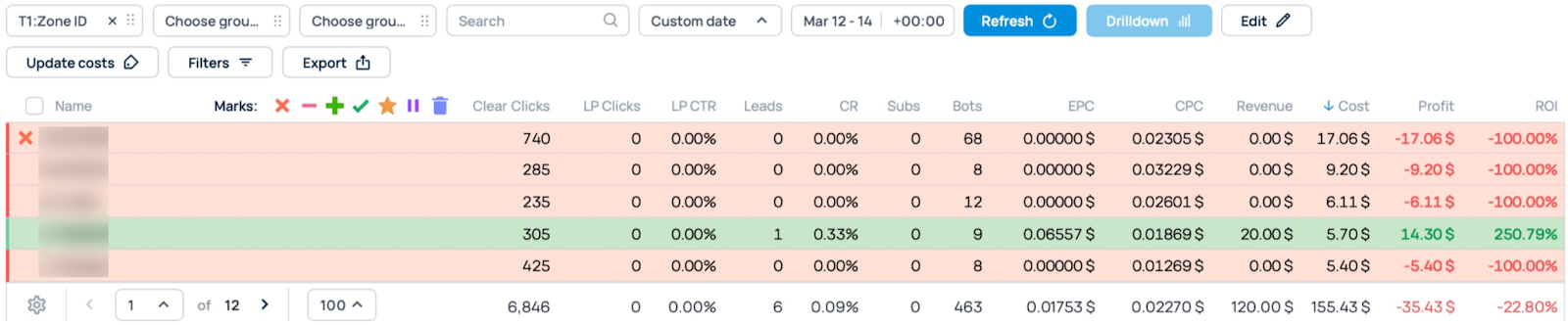
Finally, we got some numbers worth looking at. The first move was straightforward: we found a zone that had eaten up a ton of clicks without a single conversion and cut it. There was no reason to keep feeding it.
Day 4
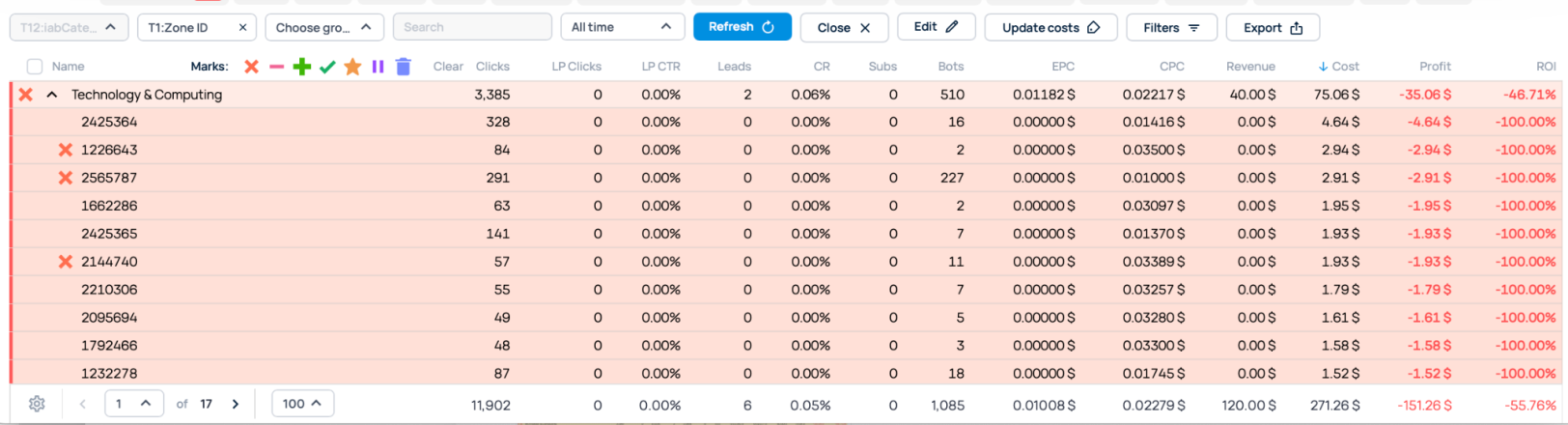
This is where IAB categories started pulling their weight. Instead of hunting zones one by one, we looked at category-level performance. One category had burned through nearly 12,000 clicks with nothing to show for it in terms of conversions that met our payout threshold.
With a single click, it was blocked, along with hundreds of underperforming zones. Without category targeting, we would've had to find and block each of those zones manually. Or could have been feeding the underperforming zones while figuring things out. Good riddance in any case, thanks to IAB targeting.

Day 5
That’s when we started to pay close attention to the offers we were testing. One was clearly lagging behind the other by a decent margin, so we paused it and allocated the remaining budget to the top performer. We also kept checking IAB categories and turned off a few more that weren't converting.

Day 6
We sorted all zones by total clicks over the campaign lifetime to get a better view of what was actually happening. Anything with high clicks and zero conversions got blocked.
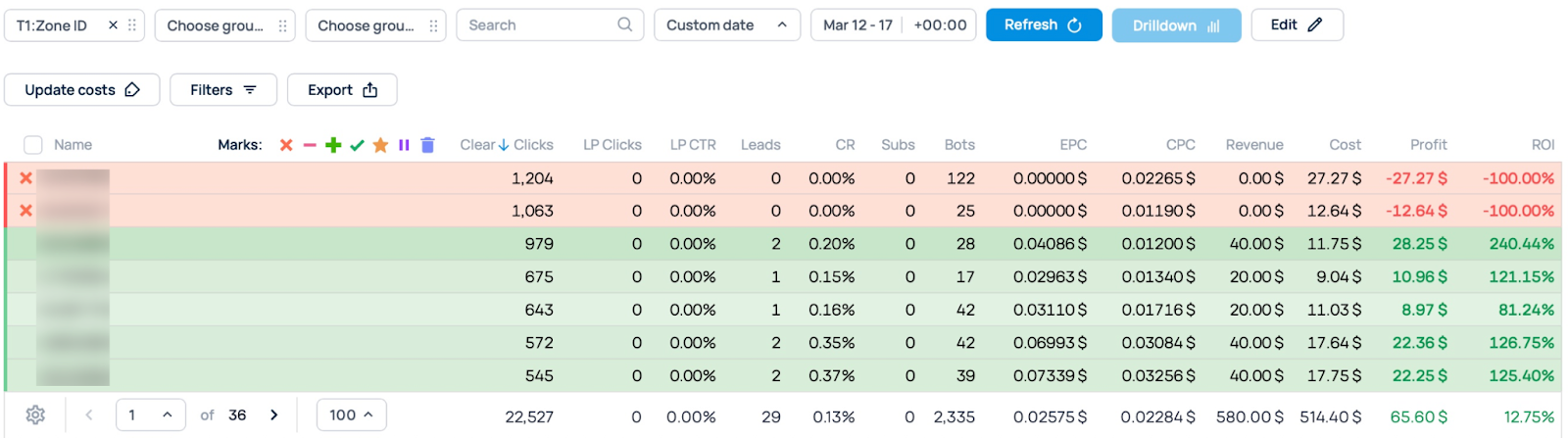
Then we hit two more IAB categories: one running in the red and another with flat-zero conversions. In our case, those were Genres and Sports, respectively. While fixing them, we blocked a few underperforming feeds.

Day 7
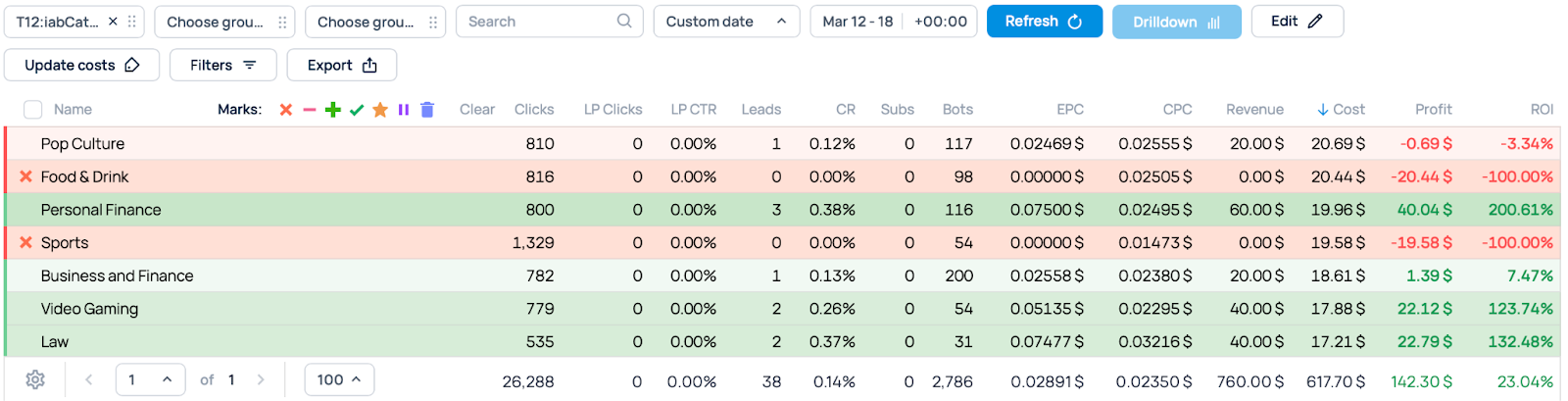
Optimization continues: zones kept running, so we kept pruning. We cut a few more dead zones and knocked out any remaining IAB categories that were still at zero conversions.
Day 8
On the final day, we wrapped things up, pulled all the final numbers, and got everything ready to share what actually happened.
RON test results
After eight days of running the campaign, here's where the numbers landed:
Cost: $665.45
Revenue: $840.00
Profit: $174.55
ROI: 26.23%
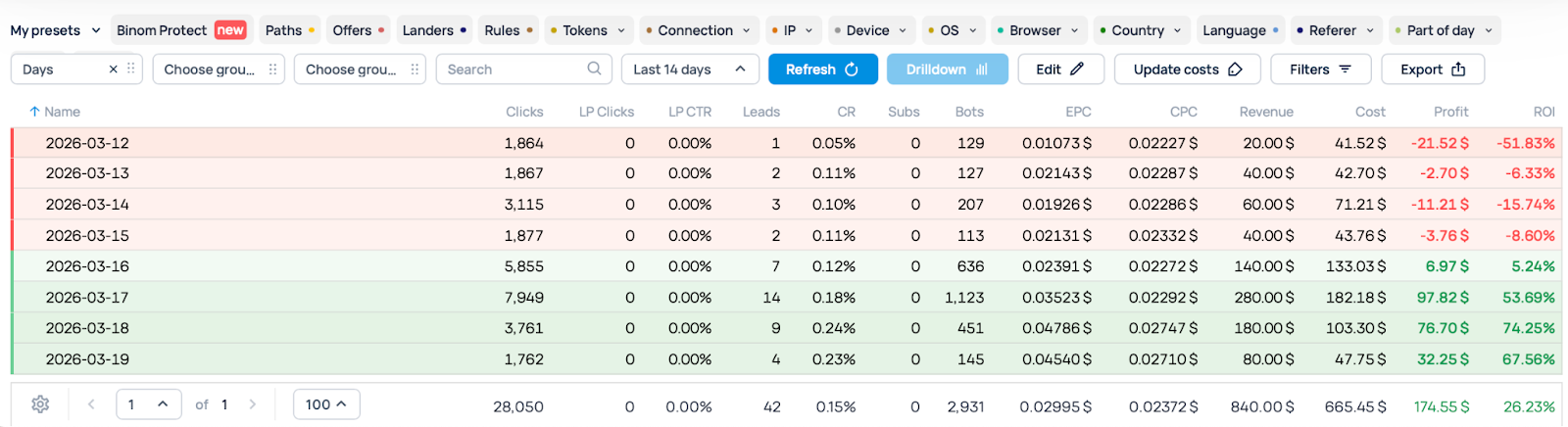
The IAB category targeting made a real difference in how smoothly the optimization went. Instead of grinding through thousands of individual placements, we could manage traffic in bulk and make cuts that actually mattered.
And on top of achieving a positive ROI, we had a whitelist of categories that we were confident in for this type of offer. That was something we could capitalize on during scaling.
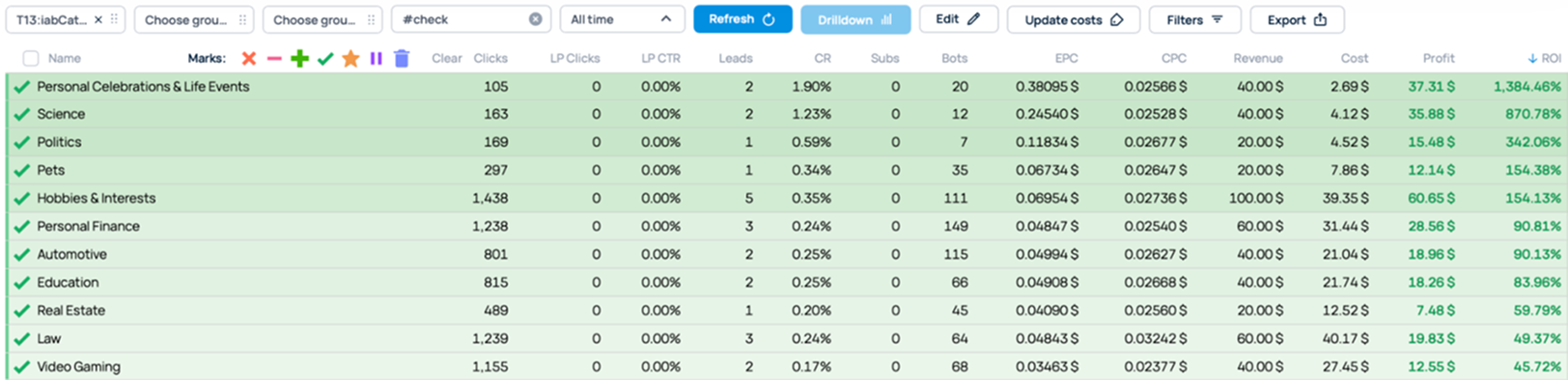
A quick note on that whitelist. The categories that performed well for us are specific to this campaign, this offer, and this moment in time. If you run the same test tomorrow with a different VPN offer or a different GEO, your results might look completely different. That's just how traffic works.
Don't skip your own testing. Run the numbers, see which categories actually perform for you, and build your own whitelist from there. The process is straightforward enough that you can do it while staying profitable.
Closing words
IAB targeting did exactly what we hoped it would in this Direct Click RON test. Grouping zones by category lets us optimize faster, cut spend on dead traffic, and focus on the segments that were actually converting. Eight days of monitoring and small adjustments turned a broad test into a profitable 26% ROI, plus a set of whitelists we could use for scaling later.
That said, this is a single test with a single set of offers. Your result will always vary depending on the vertical, GEO, and audience you're working with. The takeaway isn't "copy these exact categories." Rather, it’s about "use the category-level controls to make your own testing less painful and more precise."
If you run into questions while setting things up, support is available through the in-platform chat or via DM on any of our social channels. Register and test campaigns with some of the best tools from RollerAds, including IAB targeting.





.png)













.png)